As members interact within the community, Marketo lead updates are initiated in the following situations:
- Joining or departing a chapter or unsubscribing from the chapter mailing list.
- Bevy triggers a lead update on these actions but does not change the lead’s subscription status on Marketo because that is a “global” flag, and not for a specific list (the chapter). Bevy’s subscriptions are not global, so we do not update that global subscription status.
- Bevy does update the lead field bevyUserGroupIDs with all the chapters (comma-separated) that the user is part of. When a user leaves or unsubscribes from a chapter, Bevy updates that field value to remove the specific chapter ID from the comma-separated list.
- Registering for or unregistering from an event.
Setup in Marketo
To enable this feature, follow these instructions on the Marketo side:
- Ensure your Marketo instance has social features enabled.
- Create the following custom fields:
webServicesAPISource(string)bevyEventLastRegisteredDate(datetime)bevyUserGroupIDs(string) This is a comma-separated list of numeric IDs.
Setup in Bevy
To enable membership tracking:
- Log in to your Bevy Admin dashboard.
- Navigate to the General Settings at:
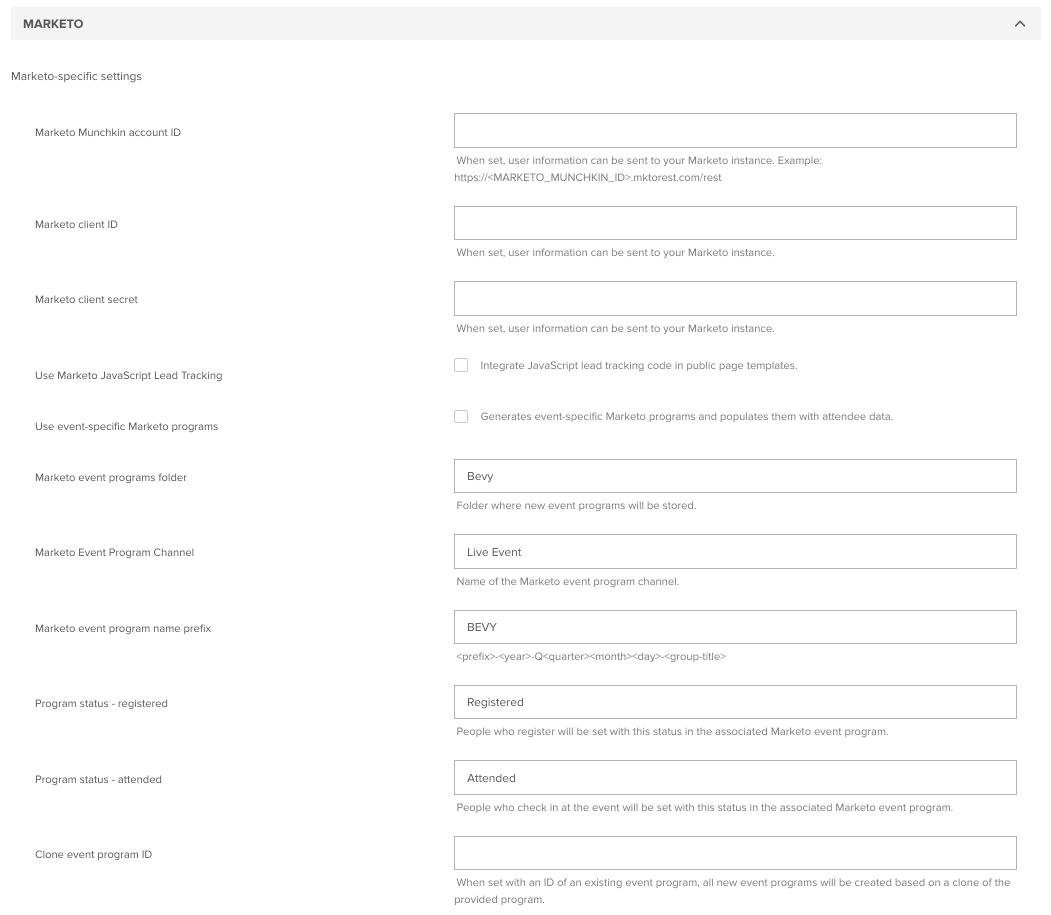
/accounts/dashboard#/admin/settings/general/<> </> - Scroll to the Marketo section and enter the following:
- Marketo client ID
- Marketo client secret
- Marketo Munchkin account ID as:
<MARKETO_MUNCHKIN_ID>(example:123-ABC-123)
- Click Save at the bottom of the page.