The Marketo JavaScript (munchkin) allows you to track page visits and clicks by embedding a snippet of JavaScript code in web pages.
Marketo describes its Munchkin JavaScript tracking code as:
Key to the capabilities of Marketo. It allows you to generate leads from visits to your website. It even tracks visitors who have not yet given you their personal information, creating anonymous leads that include the user’s IP address and other information. You set up Munchkin use in the Munchkin page in the Admin area of Marketo.
Setup in Bevy
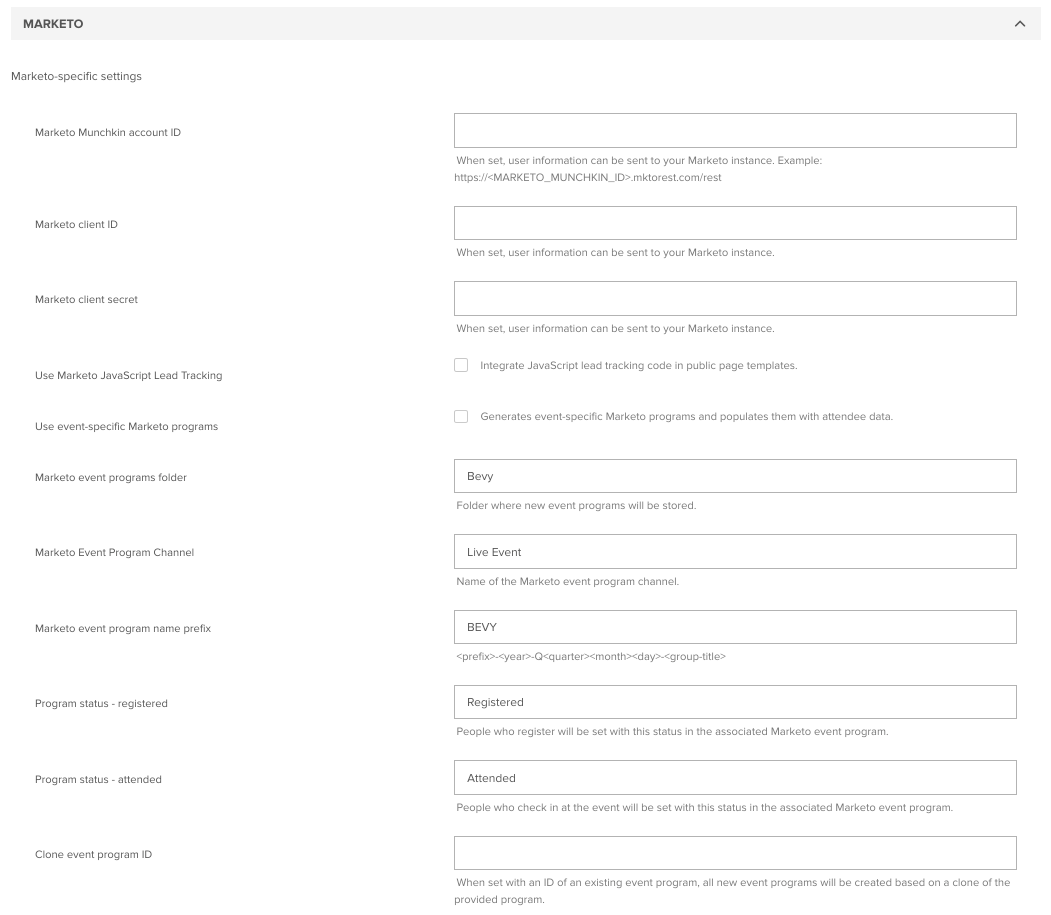
To enable JavaScript, lead tracking:
- Log in to your Bevy Admin dashboard.
- Navigate to General Settings at:
/accounts/dashboard#/admin/settings/general/ - Scroll to the Marketo section and enter your Marketo Munchkin account ID as:<MARKETO_MUNCHKIN_ID> (example:
123-ABC-123) - Select Use Marketo JavaScript Lead Tracking.
- Click Save at the bottom of the page. You will begin to see incoming data as users take action on the site.
All pages will include code similar to this:
<script type="text/javascript">
  (function() {
    var didInit = false;
    function initMunchkin() {
      if(didInit === false) {
        didInit = true;
        Munchkin.init('CHANGE-ME');
      }
    }
    var s = document.createElement('script');
    s.type = 'text/javascript';
    s.async = true;
    s.src = '//munchkin.marketo.net/munchkin.js';
    s.onreadystatechange = function() {
      if (this.readyState == 'complete' || this.readyState == 'loaded') {
        initMunchkin();
      }
    };
    s.onload = initMunchkin;
    document.getElementsByTagName('head')[0].appendChild(s);
  })();
</script>